Every Turkish e-commerce owner running WooCommerce on Linux faces the same tedious loop: order placed, cargo shipped, tracking number generated on ARAS end — and then someone has to manually copy that number into WooCommerce and update the order status. Every. Single. Order.
No. Someone still has to update WooCommerce manually.
That manual step is where fulfillment falls apart for small and mid-size shops. You're either paying for an expensive deep integration, or you're doing it by hand. I built woo-aras — a pluginless, server-side bash automation that bridges WooCommerce and ARAS Cargo without a WordPress plugin, without a monthly SaaS fee, and without touching your core WordPress files.
The Problem With Existing Solutions
ARAS Cargo is the most widely used and affordable cargo company in Turkey. WooCommerce is the dominant e-commerce platform. The integration between them should be trivial — but it isn't.
Deep integration solutions exist, but they are complex and costly, and built for high-volume enterprise shops. For small to mid-size stores, the realistic options were: pay for a plugin, hire a developer, or do it manually. None of these scale well and none of them are free.
The approach: instead of a deep bi-directional sync, the script listens to ARAS for newly generated tracking numbers, matches them against WooCommerce orders using fuzzy string matching, and then drives the entire order status transition and customer notification pipeline automatically.
How the Automation Works End-to-End
The core loop is straightforward. Every 30 minutes (configurable), the script wakes up, queries ARAS via SOAP for cargo entries from the last 10 days, cross-references them against WooCommerce's processing orders via REST API v3, and when a match is found — updates the order, attaches the tracking number via the AST plugin's REST endpoint, and fires the customer notification email.

Three APIs are involved in every successful order transition:
- ARAS SOAP API — queried via PHP SOAP client embedded in bash (
php-soap), returns cargo entries in JSON or XML - WooCommerce REST API v3 — used for reading processing orders and writing status updates (
processing → completed/shipped) - AST Plugin REST API — used to attach tracking number, carrier name, and tracking link to the completed order email
The String Matching Problem
The hardest part of this integration is not the API plumbing — it's matching the right cargo entry to the right WooCommerce order reliably.
ARAS stores the recipient's name as entered at the cargo drop-off point. WooCommerce stores the customer's billing name as entered at checkout. These two strings frequently differ: typos, abbreviated names, missing diacritics, character encoding mismatches. A naive exact-match approach fails constantly.
Mehmet Yılmaz, ARAS has Mehmet Yilmaz — the diacritic difference alone breaks an exact match. Or Ali Kaya vs A. Kaya. These are real-world mismatches that happen daily.
The solution is Levenshtein distance matching via Perl's Text::Fuzzy module. The script computes the edit distance between the ARAS recipient name and the WooCommerce billing name, and accepts the match if the distance is within the configured threshold (default: 3 characters). This handles typos, encoding differences, and minor abbreviations without false positives.
# String matching via perl Text::Fuzzy (Levenshtein distance)
# max_distance=3 means up to 3 character edits are tolerated
perl -MText::Fuzzy -e '
  my $tf = Text::Fuzzy->new($aras_name);
  $tf->set_max_distance($max_distance);
  my $dist = $tf->distance($woo_name);
  exit ($dist <= $max_distance ? 0 : 1);
'Text::Fuzzy is a mature, fast C-backed Perl module — and PHP, Perl, and GNU tools are already required by the automation anyway.
Two Fulfillment Workflows
The automation supports two order state machines depending on your business process.
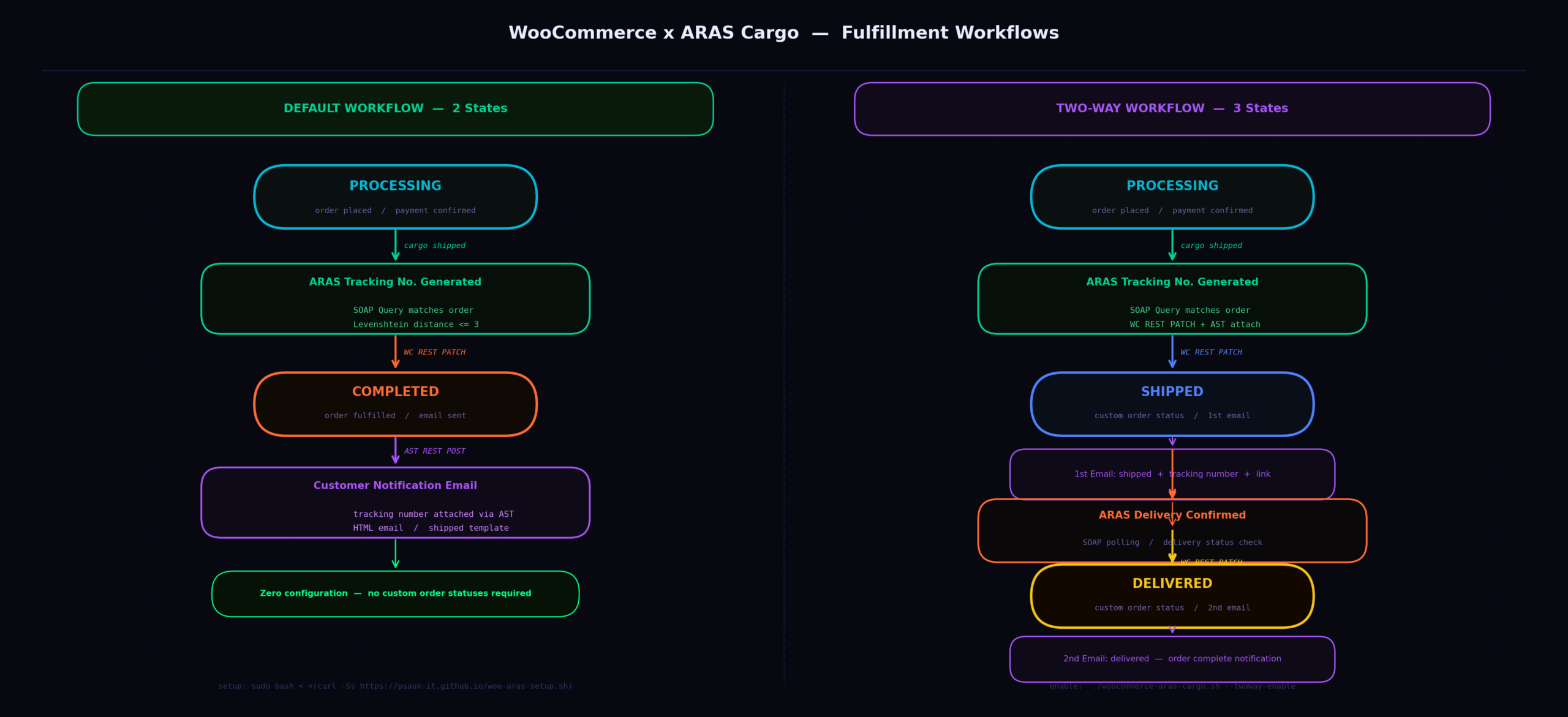
Default Workflow — Two States
When a tracking number is generated on the ARAS end, the order transitions from processing to completed. The tracking number and link are attached to the completion email via AST plugin. This is the zero-configuration path — no custom order statuses required.
Two-Way Workflow — Three States
For shops that need to distinguish between "shipped" and "delivered", the two-way workflow adds a custom delivered order status and a second notification email. The script monitors ARAS delivery confirmation and drives the second transition automatically.
Implementing this requires a custom order status registered via WordPress child theme — the automation handles this automatically during setup, or provides a step-by-step manual guide. Core WordPress and WooCommerce files are never touched — all modifications go into the child theme only.
Credential Encryption — The Bash Security Problem
Storing API credentials in bash scripts is a well-known security hazard. Plain-text credentials in a shell script are readable by anyone with filesystem access, show up in process lists, and leak into logs. The automation addresses this with encrypted credential storage.
During setup, credentials (WooCommerce REST key/secret, ARAS SOAP username/password, merchant code, endpoint URL) are encrypted and stored in the .lck directory. The main script decrypts them at runtime only when needed and never writes them to logs or stdout.
Interactive Setup — What woo-aras-setup.sh Does
The one-liner setup script handles the full environment preparation automatically:
# One-liner setup
sudo bash < <(curl -Ss https://psaux-it.github.io/woo-aras-setup.sh)
Under the hood, woo-aras-setup.sh performs the following in sequence:
- Detects the Linux distribution (Debian, Ubuntu, CentOS, Fedora, RHEL, Arch, Gentoo, SUSE, and more) and installs required runtime packages
- Creates a dedicated system user with limited sudo privileges — the automation never runs as root in production
- Downloads the latest source tree to the user's home directory
- Installs the
en_USlocale foriconvcharacter encoding (critical for Turkish diacritic normalization) - Prompts for all credentials interactively via
whiptail— a TUI library that keeps credentials off the terminal history - Validates the setup by running live test queries against both ARAS SOAP and WooCommerce REST before committing the configuration
- Prints a clear pass/fail status for QA purposes
Job Scheduling — Cron and Systemd
The automation supports both cron and systemd timer as scheduling backends. The default schedule runs every 30 minutes during business hours, Monday through Saturday:
# Cron schedule (default)
*/30 9-19 * * 1-6

# Systemd timer equivalent
on_calendar="Mon..Sat 9..19:00/30:00 Europe/Istanbul"

# Separate updater job — Sundays at 09:19
19 9 * * 0
The timezone is hardcoded to Europe/Istanbul — appropriate for the Turkish market this integration targets. The updater cron job runs weekly on Sunday mornings and auto-upgrades the script to the latest version from GitHub.
Hard Dependencies
| Dependency | Purpose | Notes |
|---|---|---|
curl |
REST API calls to WooCommerce and AST | Standard on most distros |
perl-Text::Fuzzy >= 0.29 |
Levenshtein distance string matching | C-backed Perl module — fast |
jq >= 1.6 |
JSON parsing for WooCommerce REST responses | Version-sensitive — 1.5 has breaking differences |
php, php-soap |
SOAP client for ARAS API queries | Already present on WooCommerce servers |
GNU awk >= 5 |
Text processing and data extraction | gawk on Ubuntu |
GNU sed >= 4.8 |
Stream editing for data normalization | BSD sed on macOS won't work |
whiptail |
TUI dialogs for interactive setup | Also known as newt/libnewt |
Debugging and Statistics
When something goes wrong — a missed order, a wrong tracking number assignment, a stalled two-way workflow — the script provides targeted debugging parameters rather than forcing you to dig through raw logs.
# Debug shipped orders — filter by date range and order/tracking ID
./woocommerce-aras-cargo.sh -g '1[1-9]-09-2024' '13241\|108324345362'

# Debug delivered orders — filter by specific date and tracking number
./woocommerce-aras-cargo.sh -z 15-09-2024 108324345362

# Check automation statistics and health
./woocommerce-aras-cargo.sh --status

# Force-ship orders stuck in processing when ARAS already shows delivered
./woocommerce-aras-cargo.sh --force-shipped
The --force-shipped flag deserves special mention. In the two-way workflow, if an order is already marked as delivered on the ARAS side before the automation had a chance to mark it as shipped, the script gets stuck — it's looking for a processing order to transition, but the order is still in processing while ARAS shows delivered. --force-shipped resolves this edge case by forcibly applying the shipped transition so the two-way pipeline can continue.
Known Limitations
The second limitation is the name match itself. The script tolerates up to 3 character edits by default (max_distance=3). If the name on the ARAS cargo entry is significantly different from the WooCommerce billing name — more than 3 characters off — the match will fail silently and the order won't be updated. You can raise max_distance to 4 or 5, but higher values increase the risk of false positive matches.
This solution is explicitly designed for small to mid-size shops. For high-volume operations where partial shipments are common or where per-order accuracy is critical, a deep integration solution is the right tool.
